
The DM4000 series of digital mobile/base-station radios is the most complete and advanced member of the MOTOTRBO family.
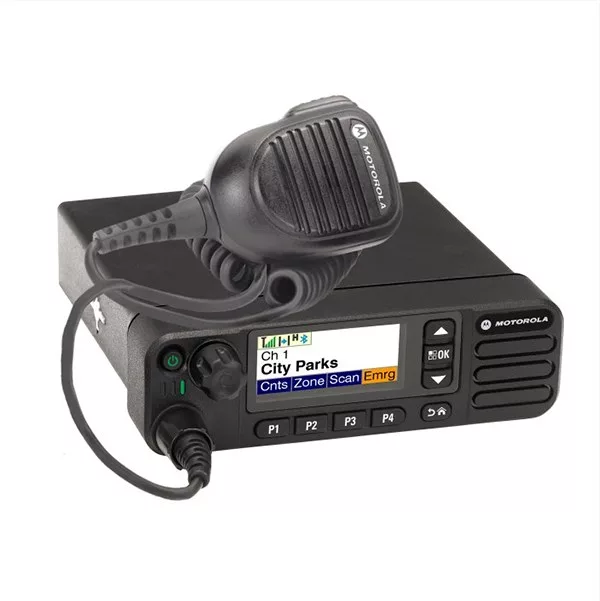
The DM4601e radio is convenient to use, with a 4-line colour display and keypad and 4 programmable buttons. It has 1000 communication channels in VHF or UHF with built-in GPS and BLUETOOTH.
MOTOTRBO digital technology provides the best audio quality along with advanced features such as intelligent audio, which adjusts the volume according to the environment; transmit interrupt, which sets priority override in critical situations; and over-the-air remote programming.
The DM4601e digital radio can be included in a repeater network, and even in linked solutions such as IP site connect, Capacity Plus, Linked Capacity Plus, Connect Plus.
Finally, the DM4601e mobile/base-station radio meets US MIL STD 810 C, D, E, F & G military standards and has IP54 ingress-protection certification. All Motorola radios go through Motorola's Accelerated Life Test, which simulates 5 years of full use, and come with a two-year warranty and one year for their accessories and batteries.
 |
Key Features
- Digital/Analogue mobile/base-station radio
- Transmitter power 1-25 Watt and 25-45 Watt
- VHF operating frequencies (136-174 MHz) or UHF (403-470 MHz)
- 1000 communication channels
- Built-in GPS & Bluetooth
- 4 programmable buttons for easy access to frequently used functions
- Numeric display and navigation buttons
- Dimensions 56.3 x 175.3 x 205.7 mm
- Weight 1800 g
- Meets the DMR standards
Easy to use and set up
- Digital audio – Intelligent audio
- Data Use
- Double channel use on the same frequencies
- Option board can be added
- Voice announcements
- Over-the-air remote programming
- Transmit Interrupt (priority override)
- Can be integrated into repeater systems, IP Site Connect, Capacity Plus and Linked Capacity Plus
Build quality
- Built to MIL STD 810 C, D, E, F, G standards
- IP54 ingress-protection certification
- 2-year warranty
Package contents
- Radio
- Mounting hardware
- Power cable
- Speaker-microphone
- User guide
No posts found
