
Download GPScom Server App - GPS Tracking for iOS & Android
Your GPS tracker is ready in minutes.
Download the free GPScom Serverapp, sign in with Google or Apple and add your GPS tracker by scanning the sticker on the device's box.
Add your device in a few simple steps
There is no IMEI to type, no serial number and no complicated settings. Follow the steps below inside the GPScom Server.
Download the app
Install GPScom Server from the App Store or Google Play.
Sign in
Open the app and sign in with your Google or Apple.
Open your devices
From the app's main menu choose:
Press +
On the Devicesscreen, press the + symbol at the top right.
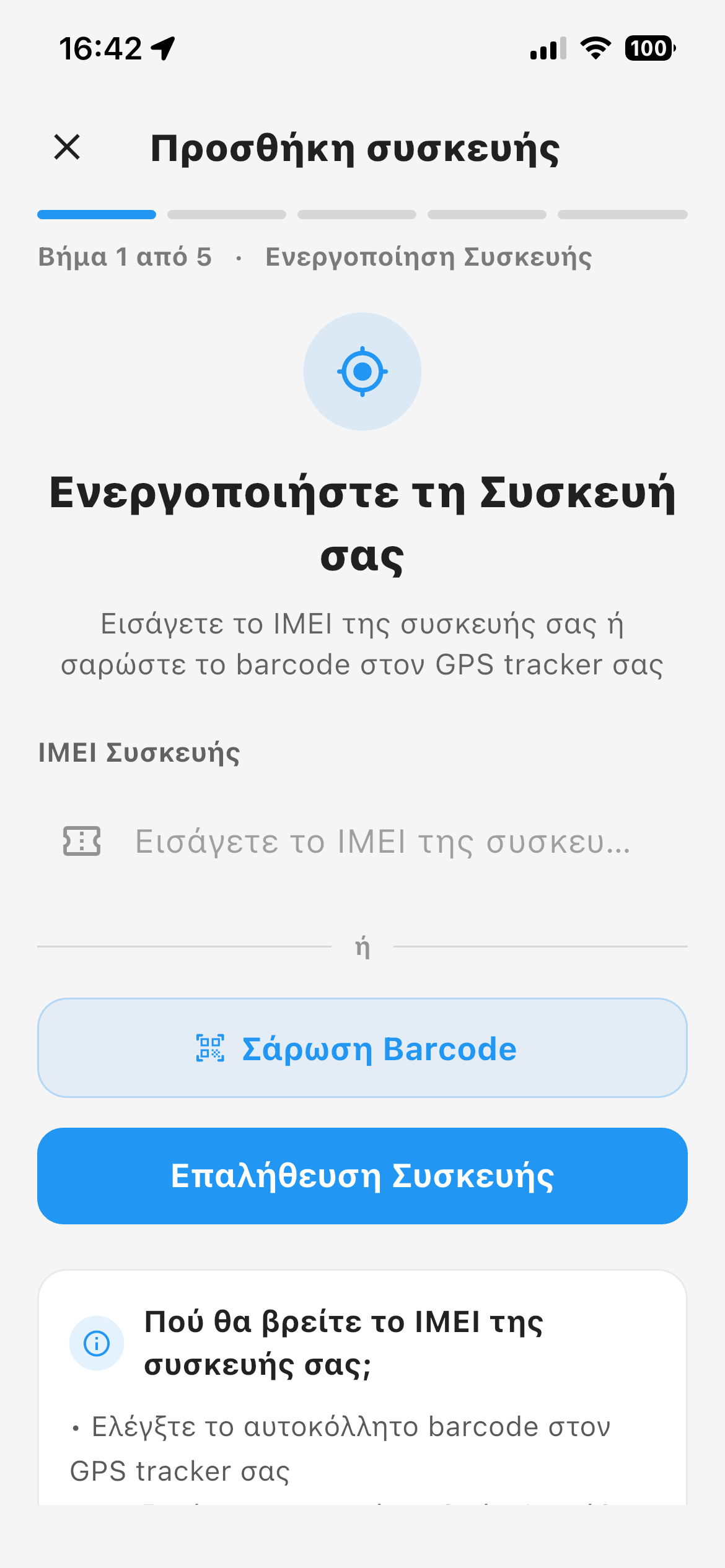
Scan the sticker
Use your phone's camera to scan the activation sticker on the GPS tracker's box.
Done.
The device is added to your account and you can start using everything in GPScom Server.
Scan and add your GPS tracker.
From Menu > Devices press the + at the top right to open the add-device screen.
The sticker you need to scan is on the GPS tracker's box you received.
That is all it takes.
Download GPScom Server now
Install the app, add your GPS tracker and reach your devices from your phone.
